Master 3D Depth Text Effects in Illustrator
In the competitive landscape of digital design, static typography often fails to capture attention. Whether you are crafting a logo for a new startup, designing a YouTube thumbnail, or creating marketing materials for a local business, the dimensionality of your text can significantly impact viewer engagement. This is where the Design Text Effect 3D Depth Style becomes an invaluable asset for creators working within Adobe Illustrator. Unlike traditional methods that require complex manual extrusion settings or heavy rendering times, this toolset offers a streamlined approach to achieving professional-grade three-dimensional typography.
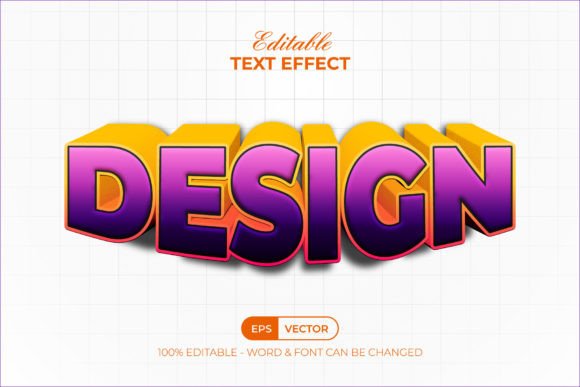
At its core, this resource is not a font itself, but rather a sophisticated collection of graphic styles. This distinction is crucial for understanding its utility. While a font dictates the shape of the letters, these graphic styles dictate how those letters interact with light, shadow, and depth. By integrating directly into the Graphic Styles menu in Adobe Illustrator, it allows users to apply intricate 3D effects to any existing text or vector shape with a single click. This workflow efficiency is particularly beneficial for professionals who need to iterate quickly on design concepts without getting bogged down in technical appearance settings.
Streamlining the Creative Workflow
One of the most significant advantages of utilizing the Design Text Effect 3D Depth Style is the drastic reduction in production time. Traditionally, creating a convincing 3D text effect in Illustrator involves multiple steps: duplicating layers, adjusting blend modes, manually creating shadows, and fine-tuning gradient meshes. For a freelancer working under a tight deadline, this process can consume hours that could be better spent on conceptualization or client communication.
With this toolset, the process is condensed into a few intuitive actions. Because the files come with well-organized layers and are fully editable, you can replace the placeholder text with your own content and instantly apply the desired style. This immediacy supports a more fluid creative process. For instance, a social media manager needing to produce a series of event posters with consistent branding can swap out dates and titles while maintaining a cohesive 3D aesthetic across all assets. The ability to edit 100% of the text and fonts ensures that the final output remains perfectly aligned with brand guidelines, regardless of the typeface used.
Enhancing Visual Communication and Impact
Visual hierarchy is fundamental to effective communication. In a sea of flat design, adding depth can guide the viewer's eye and emphasize key messages. The Design Text Effect 3D Depth Style leverages RGB color profiles to create vibrant, screen-optimized visuals that pop on digital displays. This makes it an excellent choice for web banners, app interfaces, and digital advertisements where clarity and impact are paramount.
Consider a blogger creating a header image for a tutorial on "Advanced Marketing Strategies." Using a standard flat font might convey the information, but applying a 3D depth effect adds a layer of sophistication and authority to the title. It suggests substance and importance, subconsciously signaling to the reader that the content below is valuable. Similarly, small business owners creating signage or packaging prototypes can use these effects to visualize how their brand name might look in a physical, three-dimensional space before committing to manufacturing costs.
Practical Applications Across Industries
The versatility of this graphic style set means it serves a wide array of industries. Educators creating engaging presentation slides can use 3D text to highlight key terms, making educational content more memorable for students. Entrepreneurs pitching to investors can utilize these effects in slide decks to make their company names and value propositions stand out. Even hobbyists creating custom merchandise, such as t-shirts or stickers, can benefit from the high-resolution vector output provided by the .AI and .EPS files included in the package.
Because the effect relies on vector graphics rather than raster images, scalability is never an issue. Whether the text needs to be displayed on a massive billboard or a tiny mobile screen, the edges remain crisp and clean. This adaptability is essential for modern designers who must ensure their work looks professional across diverse mediums. The inclusion of free fonts in the package further lowers the barrier to entry, allowing users to achieve the exact look demonstrated in the previews without needing to purchase additional typography licenses immediately.
Technical Flexibility and Customization
While pre-made assets are convenient, they often lack the flexibility required for unique projects. A common limitation of many downloadable effects is that they are "baked" into the design, making changes difficult. However, the Design Text Effect 3D Depth Style is designed with customization in mind. The well-organized layer structure allows advanced users to dive deeper into the appearance panel if they wish to tweak specific parameters, such as the angle of the extrusion or the intensity of the highlights.
This balance between ease of use and deep editability makes it suitable for both beginners and seasoned veterans. A novice designer can achieve a complex look without understanding the underlying mechanics of 3D modeling in Illustrator, while an experienced art director can use the base styles as a foundation for further experimentation. The compatibility with Adobe Illustrator CC and above ensures that the latest software features are utilized, providing smooth performance and access to modern rendering capabilities.
Considerations for Effective Use
Despite its many benefits, it is important to approach 3D text effects with a strategic mindset. Overuse of depth and shadows can sometimes lead to visual clutter, making text harder to read. It is generally recommended to use these effects for headlines, logos, or short calls to action rather than body copy. Legibility should always remain the priority. Additionally, since the files are optimized for RGB color, designers intending to use these effects for print media should carefully convert colors to CMYK and check for any shifts in hue or saturation that may occur during the conversion process.
Furthermore, while the included free fonts are a great starting point, pairing these 3D effects with custom typography can elevate the design even further. Users are encouraged to experiment with different typefaces to see how the depth interacts with various letterforms. Thick, bold fonts often yield the most dramatic 3D results, whereas thin scripts may require subtle adjustments to maintain clarity.
Ultimately, tools like the Design Text Effect 3D Depth Style are about empowering creators to focus on their vision rather than the technical hurdles of execution. By simplifying the creation of dimensional typography, it opens up new possibilities for visual storytelling. Whether you are looking to refresh your portfolio, enhance your brand identity, or simply add a touch of flair to your next project, mastering these graphic styles can be a worthwhile investment in your creative toolkit. The combination of time savings, professional quality, and editing freedom makes it a practical solution for anyone looking to elevate their design work in Adobe Illustrator.